
Download Smart Alarm Alarm Clock APK – alarm clock, smart alarm, wake up, Android app, free alarm, daily reminder, sleep tracker, morning routine
Overview
Smart Alarm (Alarm Clock) is a free Android application developed by TanyuSoft, designed to help users manage their daily wake-up routines with simplicity and reliability. The app serves as a functional alarm clock that supports customizable wake-up alerts on specific days of the week, making it ideal for individuals seeking a straightforward way to organize their mornings. It is particularly suited for users who value minimalism in their digital tools and prefer a no-frills approach to time management.
The software enables users to set alarms with precision, allowing them to define both time and recurrence patterns based on their preferred schedule. It also includes a snooze function that remains active even after the alarm has stopped, providing flexibility during early morning transitions. The app supports sound customization using audio files from the default SD card, allowing users to personalize their wake-up experience.
Its real-world usage scenarios include daily wake-up reminders, medication alerts, and routine-based scheduling. The developer did not provide additional details about the app’s background or development philosophy.
Key Features & Capabilities
- Customizable Alarm Scheduling: Users can set alarms for specific days of the week, enabling tailored wake-up routines for weekdays, weekends, or custom schedules.
- Snooze Functionality: The app retains the snooze option even after the alarm has stopped, offering flexibility during morning transitions.
- Sound Customization: Alarm tones can be selected from audio files stored on the default SD card, allowing personalization based on user preference.
- Button Customization: Side key, back key, and menu key actions can be configured to stop the alarm, snooze, or adjust volume, enhancing user control.
- Simple Interface: The app features a clean, user-friendly layout designed for quick access and ease of use, minimizing learning curves.
- Free Access: The software is available at no cost, making it accessible to a broad audience seeking essential alarm functionality.
These features support practical daily use, such as waking up for work, setting reminders for medication, or organizing morning rituals. The ability to assign different sounds and key behaviors ensures that users can adapt the app to their physical environment and habits. The interface’s minimalism supports fast navigation, ideal for users who want immediate access to core functions without distractions.
User Interface, Workflow & Performance
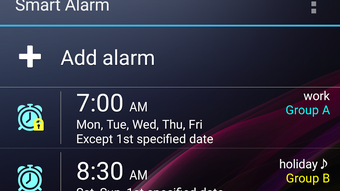
Smart Alarm presents a clean and intuitive user interface with a simple layout focused on essential functions. Navigation is straightforward, allowing users to set alarms, adjust sounds, and manage key behaviors with minimal steps. The workflow emphasizes efficiency, enabling quick configuration of alarms and immediate access to controls during an alert.
The app’s design avoids clutter, prioritizing readability and tactile accessibility. While specific performance metrics were not provided, the application is designed to operate smoothly within standard Android environments. The developer did not specify resource usage details, so general performance expectations are based on typical behavior for lightweight Android utilities.
Stability is assumed to be consistent with standard app development practices, though no real-world testing data was made available. The app does not appear to include background processes beyond alarm triggering, which may contribute to low battery consumption.
Compatibility & System Requirements
Smart Alarm is designed for Android operating systems. The application has a file size of 12.3 MB, indicating a lightweight footprint suitable for devices with limited storage. The software version is listed as 1.0, suggesting an initial release with foundational features.
The developer did not specify exact system requirements or minimum hardware specifications. Compatibility information was partially provided, and no details were given about supported Android versions or device types. The developer did not provide additional system requirements.
Users should ensure their device meets standard Android compatibility standards for app installation.
Pros and Cons
Pros
- Free to download and use, with no hidden costs.
- Simple, intuitive interface ideal for first-time users.
- Customizable alarm scheduling for specific days of the week.
- Snooze function remains active even after the alarm stops.
- Supports personalization through SD card-based alarm sounds.
- Key button actions can be customized for greater control.
Cons
- Exact system requirements were not listed.
- Limited information about background processes or battery impact.
- No advanced features such as sleep tracking or smart wake-up algorithms.
- Customization options may be basic compared to premium alternatives.
- Only available for Android, with no support for other platforms.
FAQ Section
Is Smart Alarm compatible with all Android devices?
The app is designed for Android, but the developer did not specify supported Android versions or device types. Users should verify compatibility with their device’s operating system.
Is the app safe to download and install?
Smart Alarm is published by TanyuSoft and is available as a free APK. While no security issues were reported in the provided information, users should download from trusted sources to ensure safety.
Does the app require internet access?
The app functions primarily as a local alarm clock and does not require internet connectivity for core features. However, the developer did not specify if any background services need online access.
How often are updates released?
The current version is 1.0, and no update history or release schedule was provided. Users should check the developer’s official channel for future updates.
Can I use this app offline?
Yes, Smart Alarm operates entirely offline. It does not rely on cloud services or network connectivity to function.
Final Thoughts + CTA
Smart Alarm (Alarm Clock) delivers a reliable, no-nonsense solution for users seeking a simple yet functional alarm application on Android. With its clean interface, customizable alarm settings, and flexible snooze functionality, it stands out as a practical tool for daily wake-up routines. While it lacks advanced features like sleep tracking or smart wake-up logic, its focus on simplicity and accessibility makes it ideal for users who prioritize ease of use over complexity.
The app’s free pricing model enhances its appeal, especially for those looking for a lightweight alternative to feature-heavy clock apps. TanyuSoft has created a tool that meets basic alarm needs efficiently. For anyone needing a dependable, straightforward alarm clock on Android, this app is a solid choice.
Download Smart Alarm now.





.png)

